Last Updated: March 2026
Your dental website is your most important marketing asset — yet most practice sites hemorrhage potential patients within seconds. The answer: a mobile-first, speed-optimized site built around what patients actually need, not what looks impressive to other dentists.
For related reading, see our guide on video marketing for dental practices.
For related reading, see our guide on managing online reviews for dentists.
Why Does Dental Website Design Directly Affect Patient Acquisition?
Dental patients make decisions fast. Research from the Nielsen Norman Group shows users form an opinion about a webpage in roughly 50 milliseconds — before they’ve read a single word. If your design looks dated, loads slowly, or makes it hard to book an appointment, they leave. A well-designed dental practice website turns browsers into booked patients.
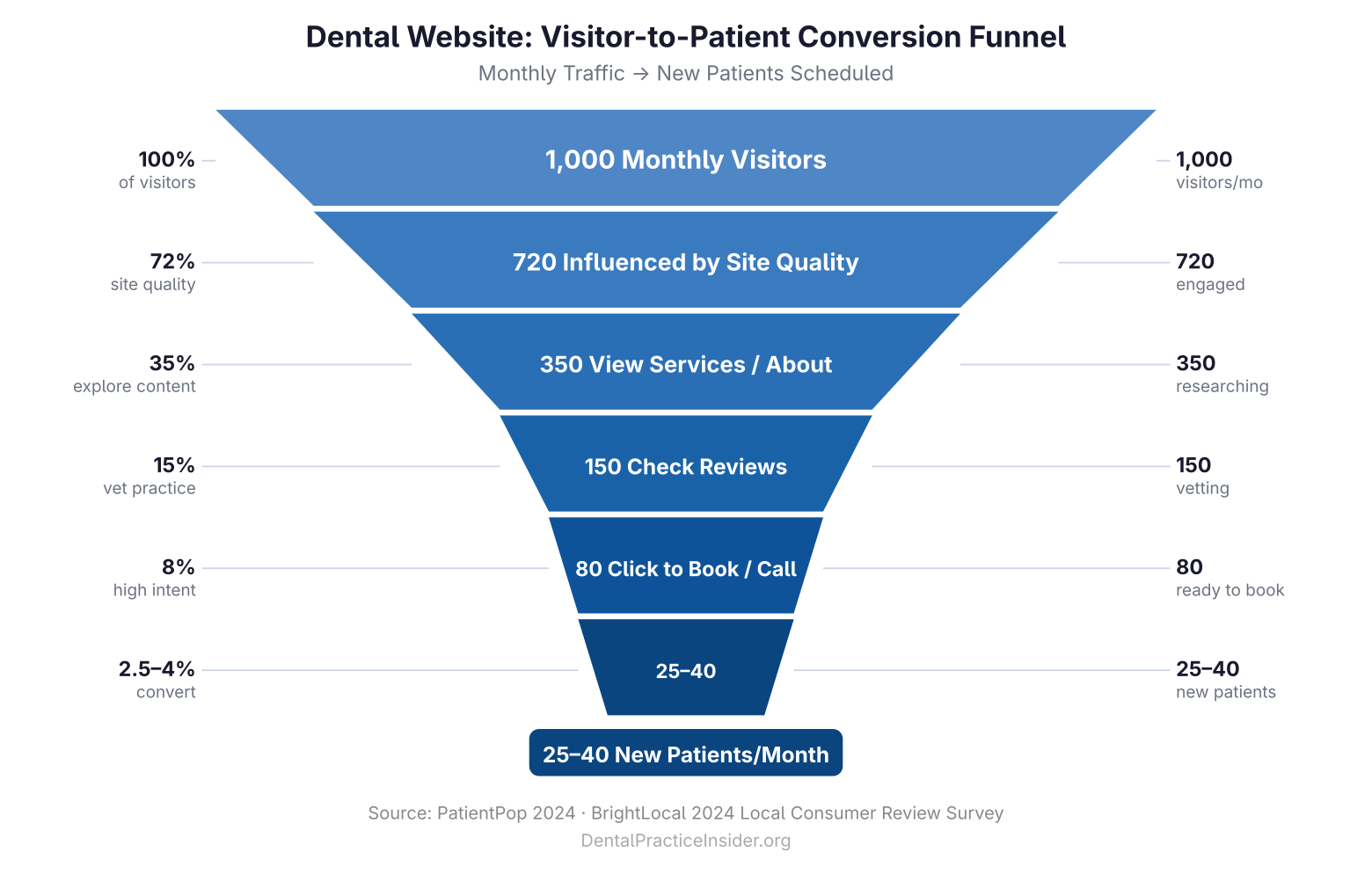
According to a 2024 PatientPop survey, 72% of patients say a practice’s website quality directly influences whether they schedule an appointment. That number is higher than the influence of word-of-mouth referrals. Your site is not a digital brochure — it is a conversion engine, and it needs to be designed as one.
This guide is part of a broader look at dental practice marketing strategy — the foundational pillar that ties every tactic together. Website design sits at the center of that strategy.
What Makes a Dental Website Mobile-First (and Why It’s Non-Negotiable)?
More than 63% of Google searches now originate from mobile devices (Statista, 2024). Google’s Core Web Vitals algorithm uses mobile performance as the primary ranking signal. If your site was built desktop-first and retrofitted for mobile, you are already losing.
Mobile-first dental website design means:
- Tap targets (buttons, phone numbers) sized at least 44×44 pixels
- Navigation that collapses cleanly into a hamburger menu without hiding critical CTAs
- Click-to-call phone numbers visible above the fold on every page
- Forms with fewer than five fields — patients will not fill out a novel on a phone screen
- Images compressed and served in WebP format to reduce load time on cellular connections
Test your current site using Google’s free PageSpeed Insights tool. Any mobile score below 80 represents a measurable patient acquisition problem.
How Fast Does a Dental Website Need to Load?
Google’s threshold for a “good” Largest Contentful Paint (LCP) score is under 2.5 seconds. Every additional second of load time increases bounce rates by roughly 32% (Google/Deloitte, 2019). That bounce is a patient who found a competitor instead of you.
Common speed killers on dental websites:
- Unoptimized images: A single hero image served at 4MB destroys mobile load times. Target under 150KB per image.
- Render-blocking scripts: Third-party chat widgets, review badges, and scheduling plugins load synchronously by default. Defer them.
- Cheap shared hosting: Dental sites on budget shared hosts routinely show Time to First Byte (TTFB) above one second. A managed WordPress host like WP Engine or Kinsta typically gets TTFB under 300ms.
- No content delivery network (CDN): A CDN serves your assets from servers close to the patient’s location. Cloudflare’s free tier handles most dental practice needs.
What Does Patient-Focused UX Actually Look Like?
Patient-focused UX is not about beautiful design — it is about removing friction between the moment a patient lands on your site and the moment they confirm an appointment. Map the patient’s journey before you design anything.
The average new dental patient visits your website with one of three intentions: they need to confirm you accept their insurance, they want to know what to expect from a procedure, or they want to book. Your navigation, homepage layout, and internal linking should make all three paths obvious within five seconds of arrival.
High-converting UX elements for dental websites:
- Trust signals above the fold: Years in practice, number of patients served, or a Google rating badge. Patients want to know immediately that you are legitimate.
- Service pages that speak to fear, not features: Instead of “Tooth Extraction Services,” write “Gentle, Pain-Free Extractions — Most Patients Are Surprised How Easy It Is.” Address anxiety head-on.
- Clear insurance information: A list of accepted insurances (or a prominent “call to verify” option) on the homepage or in the header. This single element reduces phone inquiry volume and increases conversions from insurance-driven searchers.
- Staff photos and bios: Patients choose dentists based on personal connection. A genuine photo of the dentist and team — not a stock image — is a conversion driver. Data from Hinge Marketing shows professional services firms with real team photography convert 40% better than those using stock images.
Does Online Scheduling Actually Increase Bookings?
Yes — and the numbers are unambiguous. According to MGMA (Medical Group Management Association), practices that offer online scheduling see appointment volumes increase by 24% on average compared to phone-only booking. For dental practices specifically, a 2023 Dental Economics study found that online scheduling captures appointments outside of business hours that would otherwise go to competitors.
Implementation best practices:
- Embed the scheduling widget on every service page, not just the contact page
- Show real-time availability — patients abandon schedulers that show “we’ll call you back to confirm”
- Send automated confirmation and reminder texts (this alone reduces no-shows by 30-40%)
- Offer new patient forms online, pre-appointment — eliminates clipboard friction and signals a modern practice
Popular scheduling platforms compatible with dental practice management software: NexHealth, LocalMed, and Lighthouse 360. Each integrates with Dentrix, Eaglesoft, and Open Dental.
How Should Before-and-After Galleries Be Used Without Seeming Salesy?
Before-and-after galleries are among the highest-converting content elements on dental websites — when done right. They convert because they answer the patient’s core question: “Can this dentist actually do what I need?”
Done wrong, they feel like a used-car lot. The difference is context and specificity.
Effective gallery structure:
- Organize by procedure type (veneers, Invisalign, implants, whitening) so patients find relevant cases
- Include a brief patient story for each case: age range, chief complaint, treatment used, timeline, and outcome in the patient’s words
- HIPAA note: obtain explicit written consent for any identifiable patient image, including cropped face photos where the patient could be recognized by acquaintances
- Photograph under consistent, high-quality lighting — dark or blurry “after” photos undermine trust rather than building it
Pair your gallery with patient testimonials for maximum social proof. See our guide on how patient testimonials build dental practice authority for the full framework.
What Technical SEO Elements Should Be Built Into the Site Architecture?
Website design and SEO are inseparable. A beautiful dental website that ranks on page three for your own practice name has failed. Build these elements into your design from day one:
- Schema markup: Implement LocalBusiness and Dentist schema on every page. This tells Google your practice name, address, phone, hours, and specialties — data that populates rich results in search.
- Canonical URLs: Ensure every page has one authoritative URL. www vs. non-www, trailing slash vs. no trailing slash — pick one and redirect all variants.
- Internal linking architecture: Each service page should link to related service pages and your core “about” content. This distributes page authority and helps Google understand your site’s topic hierarchy.
- Structured heading hierarchy: One H1 per page, H2s for major sections, H3s for subtopics. Screen readers and Google both depend on this structure.
For the full SEO picture, see our detailed guide to SEO for dentists and local search ranking.
What Are the Most Common Dental Website Design Mistakes?
After auditing dozens of dental sites, the same errors appear repeatedly:
- Stock photography overload: Twenty stock images of perfect white teeth and zero photos of your actual team. Patients see through this immediately.
- No clear geographic targeting: A site that says “we serve patients in our community” rather than “Serving Austin, TX and the surrounding areas” misses local SEO value and confuses out-of-area visitors.
- Hiding the phone number: Your phone number should appear in the header on every page, styled prominently. Never bury it in a contact form.
- Outdated copyright dates: A site footer showing “© 2019” signals neglect. Patients notice.
- No HTTPS: As of 2024, any dental site still running on HTTP will display a “Not Secure” warning in Chrome. This is a conversion killer and a Google ranking penalty.
How Much Should a Dental Practice Invest in Website Design?
The honest range: $3,000–$15,000 for a professionally designed dental website, with $500–$200/month for ongoing hosting, maintenance, and updates. Budget website builders (Wix, Squarespace) can get you live for less, but they carry real limitations in Core Web Vitals performance, schema control, and plugin ecosystem.
A more useful frame than cost: what is a new patient worth to your practice over their lifetime? For most dental practices, lifetime patient value (LPV) runs $2,000–$5,000. A $10,000 website that converts five additional patients per month pays back in weeks, not years.
For a complete look at how website design fits into your overall marketing spend and patient acquisition strategy, read the full Dental Practice Marketing Mastery guide.
You can also see how social proof shapes patient decisions — a concept closely tied to every design choice you make.
Key Takeaways
- Mobile-first design is mandatory — 63%+ of dental searches happen on phones
- Page load time under 2.5 seconds (LCP) is the technical threshold that matters most
- Online scheduling increases booking volume by ~24% compared to phone-only practices
- Before-and-after galleries convert when paired with specific patient stories and proper HIPAA consent
- Real team photography, transparent insurance info, and visible phone numbers are the highest-ROI UX decisions